
Skip to content
CTA_BG

Credits & Plans

How PowerPlay credits work: what uses credits, how to track usage per user and page in the app, and how to top up or change plans.
01

What uses credits

A section, editing content, creating an image, running a check, uses credits.

How many credits a request uses depends on how much work the Agent has to do: a complex section with many elements uses more than a small text edit, so there is no fixed price per action. As a rule of thumb, the plans are sized in section generations, for example, the Pro plan's 2,500 monthly credits are enough for roughly 100 section generations.

Your credits renew with your plan each month. Unused free-plan credits are valid for the duration of the free period.

02

Track your usage

You can see exactly where your credits go in the credit usage view in the app. It adds up your credit usage over time and breaks it down per user and per page or image, so you always know what was spent, by whom, and on what.
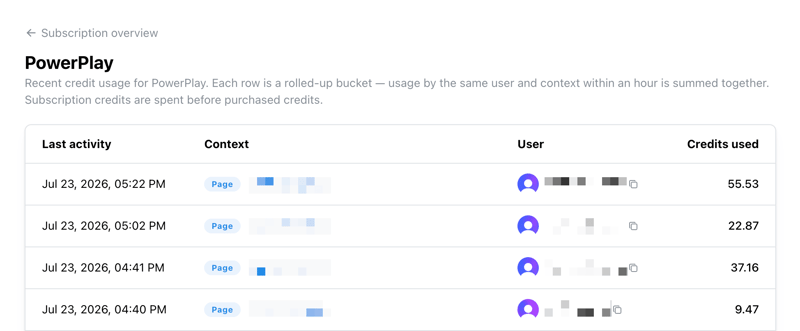
powerplay_screenshot_credit-usage
Credit usage view placeholder image - credit-usage-view.png not found in file manager
03

Plans and top-ups

Plans differ only in the number of monthly credits, every plan includes all features.
You can compare plans and current pricing on the PowerPlay page.

Run out mid-month? You can top up credits anytime without changing your plan. Admins manage the subscription and top-ups under Account Settings → Subscriptions.

Questions?

Check the FAQ for quick answers, or reach out to support.