
1. Missing variable in base.html
Older versions of the theme may not include a required variable that enables newer accessibility features.
How to fix it
- Navigate to your theme files:
Content → Design Manager → Your Child Theme → Templates → Layouts →base.html - Open the
base.htmlfile. - At the very top of the file (right after the initial commented section ending with
-->), add the following line: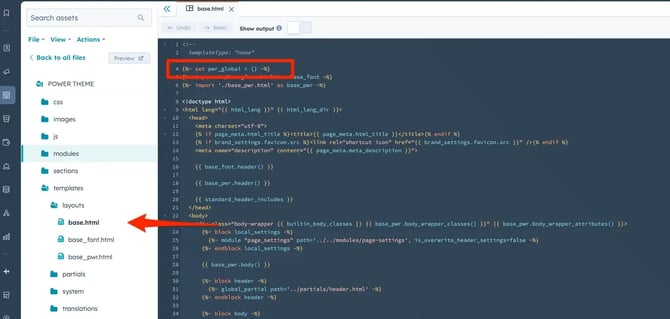
4. Click Publish/Update (top-right corner).
Why this matters
This variable initializes global theme settings required for accessibility improvements. Without it, the updated accessibility logic for components like the header and footer won’t be applied.
2. Too many unique navigation menus
HubSpot has a platform limitation that affects accessibility behavior.
The limitation
- A maximum of 10 unique navigation menus per page
- This includes:
- Header menus (including mega menus)
- Footer menus
- Any modules using global menus (e.g. bento grids, advanced modules)
If this limit is exceeded, the theme cannot apply its accessibility-optimized menu structure correctly.
How to fix it
Option 1: Reduce global menus
- Audit your page and identify all unique menu instances
- Reuse existing menus wherever possible instead of creating new ones
Option 2: Use “Simple Menu” instead
- Some modules (like mega menu, footer, or bento modules) allow switching content type
- Change from:
- Menu (global) → to → Simple Menu (module-based)
This reduces reliance on global navigation menus and avoids hitting HubSpot’s limit.
Key takeaway
For your header and footer to be fully accessibility-optimized:
- ✅ Ensure
pwr_globalis defined inbase.html - ✅ Keep total unique navigation menus under 10