
The CRM Datasource module loads HubSpot CRM objects (Products, Contacts, Companies, Deals, or custom objects) via a serverless API endpoint. Unlike the client-side datasources (JSON, XML, HubDB), the CRM datasource is server-side: filtering, sorting, searching, and paging all happen on the server, and only the matching results for the current page are sent to the browser.
This architecture is necessary for two reasons:
1. Security — The HubSpot CRM API requires a Private App token for authentication. This token must never be exposed in browser-side code. The serverless function keeps the token safe on the server.
2. Scale — CRM objects can number in the tens or hundreds of thousands. Loading all products into the browser at once is impractical. The CRM Search API handles filtering and paging on the server, returning only the relevant slice of data.
The trade-off is that every interaction (changing a filter, typing a search, loading the next page) triggers a new network request to the serverless endpoint, which introduces a small loading delay compared to client-side datasources.
Configuration
|
Field |
Type |
Description |
|---|---|---|
|
Name |
Text |
A unique identifier for this datasource (e.g. |
|
Endpoint |
Text |
The serverless function endpoint to call. This can be a relative path like |
The endpoint path is defined in the serverless.json file of your serverless function package. See the Serverless documentation for how to set up these endpoints.
How It Works
Request Flow
-
The list module collects the current state from all controls (filters, sort, search, paging).
-
The CRM datasource module builds a POST request body with this state.
-
The request is sent to the serverless endpoint (e.g.
/_hcms/api/products/list). -
The serverless function translates the request into a HubSpot CRM Search API call, using the Private App token stored as a HubSpot secret.
-
The CRM API returns matching objects, pre-filtered, pre-sorted, and pre-paged.
-
The serverless function strips the response to only the allowed properties (as configured in
serverless.json). -
The cleaned response is sent back to the browser.
-
The list renders the results.
Request Format
The module sends this JSON body to the endpoint:
{
  "filterGroups": [
    {
      "filters": [
        {
          "propertyName": "category",
          "operator": "EQ",
          "value": "electronics"
        }
      ]
    }
  ],
  "sorts": ["name"],
  "query": "wireless speaker",
  "after": 0,
  "limit": 8
}
-
filterGroups— An array of filter group objects. Within a group, filters are combined with AND logic. Multiple groups are combined with OR logic (matching HubSpot’s CRM Search API semantics). -
sorts— An array of property names to sort by. Ascending is the default; prefix with-for descending (e.g.-hs_price_eurfor highest price first). -
query— The full-text search query entered by the visitor. -
after— The pagination cursor (offset).0for the first page, then the value from the previous response’spaging.next.after. -
limit— The number of items per page.
Response Format
The endpoint must return a JSON object with this structure:
{
  "total": 42,
  "results": [
    {
      "id": "123",
      "name": "Wireless Speaker Pro",
      "hs_price_eur": "79.99",
      "hs_sku": "WSP-001",
      "description": "Premium wireless speaker with 360° sound.",
      "category": "electronics",
      "hs_images": "https://cdn.hubspot.com/..."
    }
  ],
  "paging": {
    "next": { "after": 8 }
  }
}
-
total— The total number of matching objects (not just the current page). Used to determine if a “Load More” button should be shown. -
results— The array of CRM objects for the current page. Each object only contains the properties explicitly listed in theserverless.jsonconfiguration — sensitive or unnecessary properties are excluded. -
paging.next.after— The cursor for the next page. If this field is absent, there are no more pages.
Caching
The CRM datasource includes built-in caching to reduce API calls and improve performance:
-
In-memory cache — Responses are cached in JavaScript memory with a 5-minute TTL (time to live). If the same request (same filters, sort, search, page) is made again within 5 minutes, the cached response is returned instantly without a network request. This is especially helpful when visitors navigate back to a previous page.
-
LocalStorage cache — Responses are also stored in the browser’s
localStoragewith a 5-minute TTL. This cache persists across page navigations (e.g. clicking a product detail link and pressing the back button). The cache key is based on the datasource name and request parameters.
Both caches are automatically disabled in debug mode (add the query string?hsDebug=true to your URL) so you always see fresh data during development. This means you don’t need to manually clear caches while testing.
Setting Up the Serverless Endpoint
The framework includes ready-to-use serverless functions in list/src/serverless/crm-list.functions/. These handle the complete flow of receiving filter/sort/search/paging requests, querying the CRM API, and returning cleaned results.
See the Serverless documentation for full setup instructions, including how to: - Create a HubSpot Private App and store the token as a secret - Configure the serverless.json with your CRM object type and allowed properties - Add a schema endpoint for data-schema filters - Deploy to HubSpot
Example: Product List Endpoint Configuration
The serverless.json configuration for a product catalog:
{
  "runtime": "nodejs18.x",
  "version": "1.0",
  "secrets": ["MOMENTUM_ACCESS_TOKEN"],
  "endpoints": {
    "products/list": {
      "method": "POST",
      "environment": {
        "hs_api": "products",
        "properties": "hs_sku, hs_price_eur, name, description, hs_images, category",
        "withSchema": "category"
      },
      "file": "list-crm-objects.js"
    },
    "products/list-schema": {
      "method": "GET",
      "environment": {
        "hs_api": "products",
        "properties": "category"
      },
      "file": "get-crm-object-schema.js"
    },
    "products": {
      "method": "GET",
      "environment": {
        "hs_api": "products",
        "properties": "hs_sku, hs_price_eur, name, description, hs_images, category"
      },
      "file": "get-crm-object.js"
    }
  }
}
This defines three endpoints: - products/list — The main listing endpoint (POST). Accepts filter/sort/search/paging parameters and returns matching products. - products/list-schema — The schema endpoint (GET). Returns CRM property metadata (names, labels, types, dropdown options) for the category property. This enables data-schema filters. - products — A single-object endpoint (GET). Returns one product by ID (used for product detail pages).
Datasource Module Configuration
Datasource Module:
  Name:     product_datasource
  Endpoint: products/list
That’s it. The module will POST requests to /_hcms/api/products/list and handle the response automatically.
Schema Support
The CRM datasource supports a schema endpoint that provides metadata about CRM properties — their names, display labels, data types, and dropdown options. This enables data-schema filters that automatically generate filter options from the CRM property definitions, rather than requiring you to manually list every option.
How Schema Works
-
When the page loads and the datasource is initialized, it checks if the endpoint has a corresponding
-schemaendpoint (e.g.products/list-schema). -
The schema endpoint calls the HubSpot CRM Properties API and returns metadata for the configured properties.
-
This schema is attached to the data response and made available to filter modules.
-
Data-schema filter modules can query the schema to build their options. For example, reading all dropdown options for the
categoryproperty.
When the withSchema environment variable is set in serverless.json, the main list endpoint also includes schema data in every response, so a separate schema request is not always necessary.
CRM Data-Schema Filter Example
Filter Module:
  Name:                  category_filter
  List Name:             product_list
  Mode:                  Data-Schema
  Style:                 Dropdown
  Filter Query:          schema.properties[name="category"].options
  Filter Name Query:     object.value
  Filter Label:          [[object.label]]
  Filter Property Name:  category
  Filter Value Query:    object.value
  Filter Operator:       ==
  URL Parameter:         true
  URL Parameter Name:    category
This reads the category CRM property’s dropdown options and creates a filter option for each one. The object.label gives the human-readable name (e.g. “Electronics”), and object.value gives the internal value (e.g. “electronics”). When someone adds a new category option in HubSpot’s CRM settings, the filter automatically picks it up.
Security
The CRM datasource has several security layers:
-
Private App Token — The HubSpot Private App token is stored as a HubSpot secret and is only accessible to serverless functions. It is never exposed in browser-side code or network responses.
-
Property Allowlist — Only properties explicitly listed in the
propertiesenvironment variable inserverless.jsonare returned to the browser. Even if the CRM object has 50 properties, only the allowed ones appear in the response. Sensitive properties (internal notes, lead scores, etc.) are excluded by default. -
Contact List Membership — For non-public data, the serverless function can check whether the logged-in contact is a member of specific HubSpot lists before returning data. This enables access control based on customer segments or membership tiers.
-
Request Validation — The serverless function validates incoming filter operators and property names against an allowlist to prevent injection of arbitrary CRM API queries.
Real-World Example: Product Catalog with Wishlist
The Wishlist use case demonstrates a full CRM-powered product catalog:
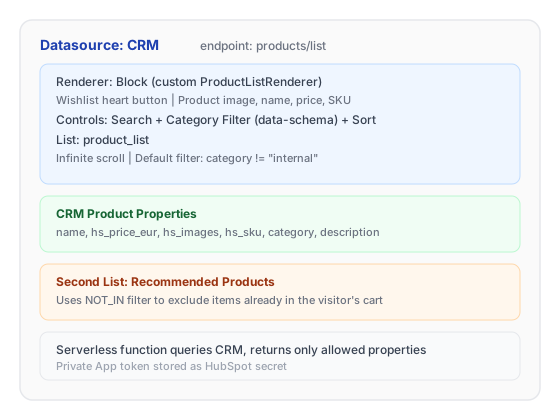
CRM Page Layout
This setup demonstrates: - CRM datasource with server-side filtering and paging - Custom renderer class extending BlockListRenderer - Data-schema filter auto-generated from CRM property options - Multiple lists on the same page sharing a datasource - Integration with client-side cart state ($cartProductIds())