
Understanding Header Types
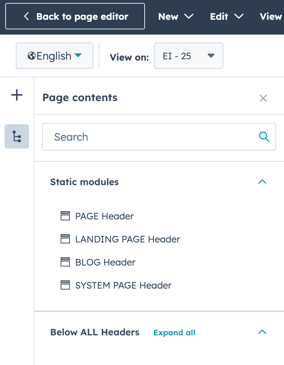
Our theme supports four different header types that can be configured for various page types, including:
- Website pages
- Landing pages
- Blog pages
- System pages
Configuring Headers
To create and manage different header designs across your website:
- Access your global header settings using the provided documentation link.
- Choose the appropriate header type based on the page you are working on.
Each header type is designed for specific use cases.
For example, you can configure a dedicated landing page header that looks and behaves differently from the header used on your main website pages.
Using Child Themes
If you need a header that differs from your theme's default but applies to multiple pages:
- Consider creating a child theme. This allows for different styling and headers independent of your main theme.
- Follow the guidelines in the documentation for creating a child theme in HubSpot.
Limitations
Be aware that HubSpot enforces certain limitations on child themes based on your subscription. Ensure you review these limitations to understand what is possible within your account.
Conclusion
By utilizing the global header settings and child themes, you can effectively create and manage multiple header designs tailored to different sections of your website. For further customization, refer to the documentation provided for detailed instructions.