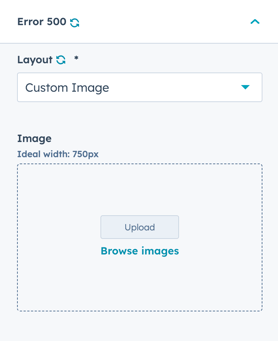
System Page Image Specifications
The image width should be 750px and can be any height.
Recommended dimensions: 750px x 300px works nicely.
Image size guidelines:
Optimal width: 750px
- Ensures crisp display on all devices
- Works well with system page layout
- Maintains consistent appearance
Flexible height:
- Minimum: 200px (for simple graphics)
- Recommended: 300px (balanced composition)
- Maximum: 600px (for detailed illustrations)
Aspect ratios that work well:
- 750px x 300px (2.5:1 ratio) - Recommended
- 750px x 400px (More vertical space)
- 750px x 500px (Square-ish composition)
Theme Settings
Where are System Page settings located?
Theme Settings Location
There are 2 settings in Theme Settings for System Pages:
Navigate to: Theme Settings → System Pages
Available settings:
- Error 404
- Error 500
Access path:
- Open Theme Settings
- Navigate to System Pages section
- Configure Error 404 settings
- Configure Error 500 settings
- Save changes
There are 2 settings in Theme Settings for System Pages: Error 404 and Error 500
System Pages → Error 404
Option to overwrite the default image used on the 404 Error template.
Choice of No Image, Default Image (Theme), and Custom Image.
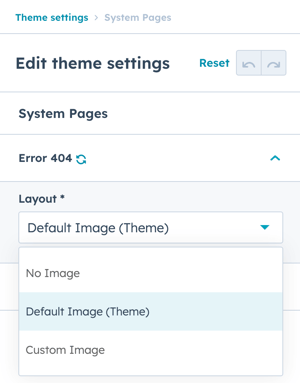
When Custom Image is selected, you'll have the option to upload an image or browse files.
The optimal width for the image is 750px.
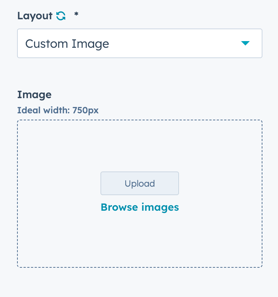
System Pages → Error 500
Option to overwrite the default image used on the 500 Error template.
Choice of No Image, Default Image (Theme), and Custom Image.
When Custom Image is selected, you'll have the option to upload an image or browse files.
The optimal width for the image is 750px.