
Theme Settings
What are SEO Schema Settings?
SEO Schema Settings control structured data markup that helps search engines understand your content. These settings help you:
- Automatically generate Schema.org markup
- Improve search engine understanding
- Enable rich search results
- Enhance SEO performance
- Provide structured business information
- Optimize blog post indexing
Where are SEO Schema Settings located?
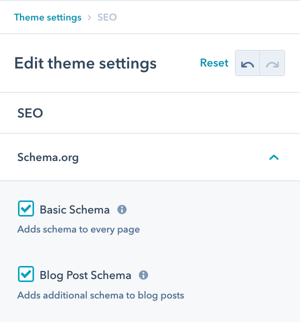
There are 2 settings in Theme Settings for SEO:
- Basic Schema
- Blog Post Schema
Navigate to: Theme Settings → SEO → Schema.org
Overview: Configure automatic Schema.org structured data markup for your website and blog posts.
What is Schema.org?
SEO → Schema.org
Option to disable Schema (recommended only if you plan to create your own).
What is Schema.org? Schema.org is a collaborative project that provides standardized structured data markup vocabulary. It helps search engines understand your content better.
Purpose: This additional information can be leveraged by search engines or other applications.
How it helps:
- Search engines better understand content
- Enables rich search results (rich snippets)
- Improves content categorization
- Enhances local business visibility
- Provides context for your data
Enable/Disable:
- Default: Enabled (automatic schema generation)
- Disable: Only if creating custom schema
- Recommended: Keep enabled unless advanced need
What is Basic Schema?
SEO → Schema.org → Basic Schema
Company name, logo, address, and language from Settings → Account Defaults → Branding, as well as Email and Phone, configured in the POWER header.
Basic Schema includes:
Company/Organization Information:
- Company name
- Logo
- Address
- Language
What is Blog Post Schema?
SEO → Schema.org → Blog Post Schema
Comprehensive blog post structured data automatically generated.
Blog Post Schema includes:
Content Information:
- Headline (post title)
- Image (featured image)
- Abstract (post excerpt/meta description)
- Text (post content)
- URL (post URL)
- Author
- Publish Date
- Word Count
- Tags